
Tzedakah
The Tzedakah system puts donated Shekels into one shared fund. Staff use that money to help new players get started on the server.
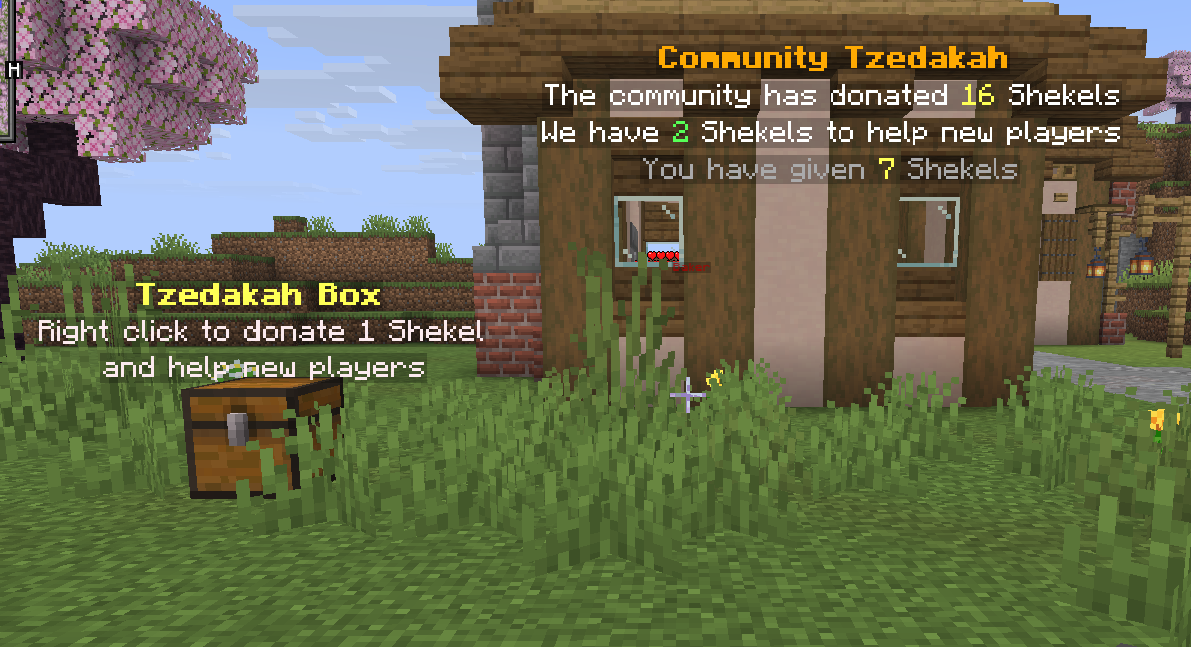
Donating at a Tzedakah Box
Section titled “Donating at a Tzedakah Box”Find the Tzedakah Box at spawn. Right-click it. Each click donates 1 Shekel from your balance, and the chest stays closed.
The hologram above the box shows how much the community has donated, how much is left in the fund, and your personal contribution. Every Shekel paid out came from a player donation.
How the fund is tracked
Section titled “How the fund is tracked”Your lifetime donation total never goes down when staff spend money from the fund. For example, if you give 7 Shekels and staff later use 5 to help a new player, your own total still reads 7.
The community display separates three numbers:
| Display | Meaning |
|---|---|
| Community donated | All Shekels donated over time |
| Available fund | Shekels that staff can give out now |
| You have given | Your lifetime donation total |
Placing your own box
Section titled “Placing your own box”If you own a Tzedakah Box, place it like a chest. A donation hologram appears above it automatically. Break the box to pick it up again.
Shekel balance and Gold Shekel items
Section titled “Shekel balance and Gold Shekel items”The Tzedakah Box uses your balance, which is the server’s regular currency. Check it with /balance.
A Gold Shekel is a physical item that you can store or trade. /deposit <amount|all> turns Gold Shekel items into balance, and /withdraw <amount> turns balance into items. Ask staff for the current exchange rate because one Gold Shekel item can be worth more than 1 balance Shekel.